Have you ever thought this while designing a system? "Seriously, this block and that block are almost identical, so why do I have to create them from scratch every time?" We've all been there—when multiple components share common features but also have unique ones, diagrams get complicated and hard to manage. It's a frustrating moment. Today, we're going to dive into a powerful and elegant concept called 'Generalization' that solves this very problem, in a way that's easy and fun. Join me, and you'll witness the magic of how a complex model can become remarkably clean! 😊
🤔 What Exactly Is Generalization?
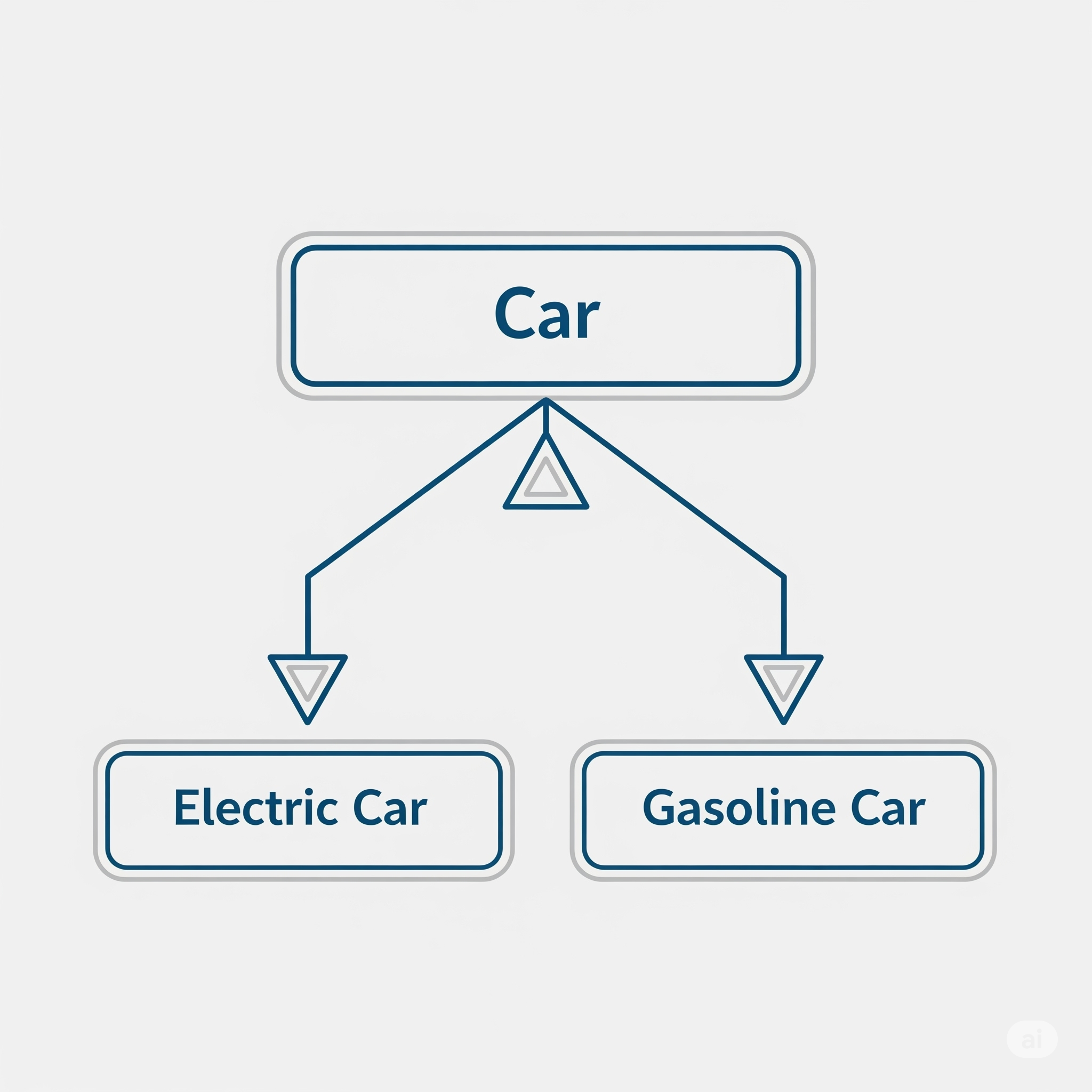
Generalization is very similar to what we commonly call 'inheritance' in object-oriented programming. It's a relationship that allows subclasses to inherit the characteristics and functions of a superclass. In SysML's Block Definition Diagrams (BDD), generalization is used to represent this inheritance relationship between various classifiers like blocks, interfaces, and signals.
Let's take an example. Imagine a superclass called 'Car'. All cars have common attributes like 'wheels' and 'engine type,' and functions like 'drive' and 'stop'. Subclasses like 'Electric Car' or 'Hybrid Car' inherit these general features from 'Car' while adding their own special functionalities, such as 'electric charging' or 'combined use of fuel and electricity'.
Using generalization has great benefits!
- Reusability & Extensibility: Define common functions once in a superclass, and subclasses can inherit, use, or extend them.
- Ease of Maintenance: If you need to modify a common function, just change the superclass, and it applies to all subclasses. So convenient!
- Model Clarity: The system's structure becomes clear at a glance, and you can clearly define relationships between components.
📊 Inheritance and Redefinition: The Core Functions of Generalization
The greatest power of generalization comes from 'inheritance' and 'redefinition'. A subclass can inherit the structural and behavioral features of its superclass and modify them to suit its own needs.
| Category | Description |
|---|---|
| Inheritance/Redefinition of Structural Features | A subclass can add new properties or ports that are not in the superclass. It can also 'redefine' existing features, such as changing the type to a more restrictive one or modifying default values. |
| Inheritance/Redefinition of Behavioral Features | Behavioral features like operations (functions) of the superclass can also be inherited and redefined. This allows for flexible design, such as modifying the signature of a service. |
'Multiple inheritance', where a subclass inherits features from multiple superclasses, is also possible. However, it can make the structure overly complex and difficult to understand, so use it judiciously only when absolutely necessary!
📚 Hands-On: Modeling Generalization with Enterprise Architect (EA)
Alright, enough theory—it's time to get our hands dirty! Let's walk through how to create a generalization relationship in EA step-by-step using the example: "Model 'Car' as a superclass, and 'Electric Car' and 'Internal Combustion Engine Car' as subclasses." 🚗
- Create the Superclass 'CAR' Block
First, create a new BDD and a block named 'CAR'. To represent the car's power generator, energy storage, and energy source, add `Power Generator`, `Energy Storage`, and `Energy Source` blocks and assign them as properties of the 'CAR' block. - Add Behavioral Features
Add an Activity named `Initialize` to the CAR block, an Operation named `Re-Energy`, and a Reception to handle a Signal called `Acceleration`. Now our 'CAR' block is a fine superclass with both properties and behaviors!
The completed CAR block.
- Create Subclasses and Connect the Generalization
Now, create a new BDD called 'CAR Types' and create 'E-CAR' (Electric Car) and 'ICE-CAR' (Internal Combustion Engine Car) blocks. From the toolbox, select the 'Generalization' arrow and drag it from the subclass (E-CAR) to the superclass (CAR). If you see a relationship with a hollow triangle arrowhead, you've succeeded! - Check and Display Inherited Features
Select the E-CAR block and look at the 'Parts/Properties' tab in the 'Features' window. You'll see the properties from CAR have been inherited. To display them on the diagram, right-click the block and go to the 'Compartment Visibility' menu. Here, you can check options like 'Inherited Operation' and 'Receptions' to display the inherited features neatly on your diagram.
The '::CAR' notation clearly shows the inheritance relationship.
- Specialize the Subclasses (Redefinition)
Now, let's make each subclass more specific. For the E-CAR, change the type of `Power Generator` to `Motor` and `Energy Storage` to `Battery`. This is how you can 'redefine' the type of an inherited property to a more specific subtype. Similarly, for the ICE-CAR, you can change them to `Engine`, `Fuel Tank`, and so on.
🗂️ Adding Rules with Generalization Sets
Finally, let's look at 'Generalization Sets', which are used to group subclasses and define rules. They are used to describe how instances of a superclass relate to instances of its subclasses.
Key Properties of a Generalization Set 📝
- Coverage: Indicates whether all instances of the superclass are included in this set ('complete' or 'incomplete').
- Overlapping: Indicates whether one instance of the superclass can be an instance of multiple subclasses in the set ('disjoint' or 'overlapping').
In our example, since a car could also be a hybrid, the coverage is 'incomplete'. And since a car cannot be both an electric car and an internal combustion car at the same time, the overlapping property is 'disjoint'.
In EA, you can configure this by right-clicking the generalization line and selecting the 'Advanced' → 'Generalization Set' menu. This will add a notation like `{incomplete, disjoint}` to the diagram, making the model's rules even clearer.
'Generalization' at a Glance
So, what did you think? Today, we explored 'Generalization', a core concept in system modeling. It might feel a bit unfamiliar at first, but if you apply what you've learned today step by step, your modeling skills will surely level up! Generalization is an essential tool for efficiently modeling complex systems and clearly defining interactions between components. If you have more questions, feel free to ask in the comments anytime~ 😊