Have you ever found it tricky to model how different parts of a system interact without being physically part of each other? For example, how does a car's battery interact with an external charger? In SysML, this is precisely where reference properties come into play. They are a key element for structurally modeling complex systems, and understanding them is crucial for any systems engineer. Let's dive in and master them together! 😊
What Are Reference Properties? 🤔
A reference property is an attribute of a block that refers to one or more instances of other blocks. Unlike a part property, which implies ownership (the part is destroyed if the whole is), a reference property signifies a 'required' relationship. Think of it as a pointer or a link.
You can find these properties in a special area of a block diagram called the ‘references’ compartment. This distinction is vital because the referenced block instance can exist even if the referencing block is removed, offering much greater modeling flexibility.
Part Property: Represents ownership (a whole 'owns' its parts). The part is created and destroyed with the whole. It's a strong, compositional relationship.
Reference Property: Represents usage or interaction (a block 'needs' or 'references' another). There is no ownership. The referenced item exists independently.
Understanding Associations: Reference vs. Shared 🔗
Associations define the relationships between blocks. While standard reference associations are the most common, SysML also defines 'shared' associations, which can sometimes be confusing. Both indicate a relationship weaker than a composite (part) relationship, but they have subtle differences.
| Association Type | Symbol | Meaning |
|---|---|---|
| Composite | Solid line with a filled (black) diamond | Strong ownership. The part cannot exist without the whole. (Part Property) |
| Shared | Solid line with an unfilled (white) diamond | Weaker ownership. The part can exist independently of the whole, but is still considered a part of it. (Shared Property) |
| Reference | Solid line with no diamond (may have an open arrowhead for direction) | No ownership. Simply indicates a reference, access, or necessary interaction. (Reference Property) |
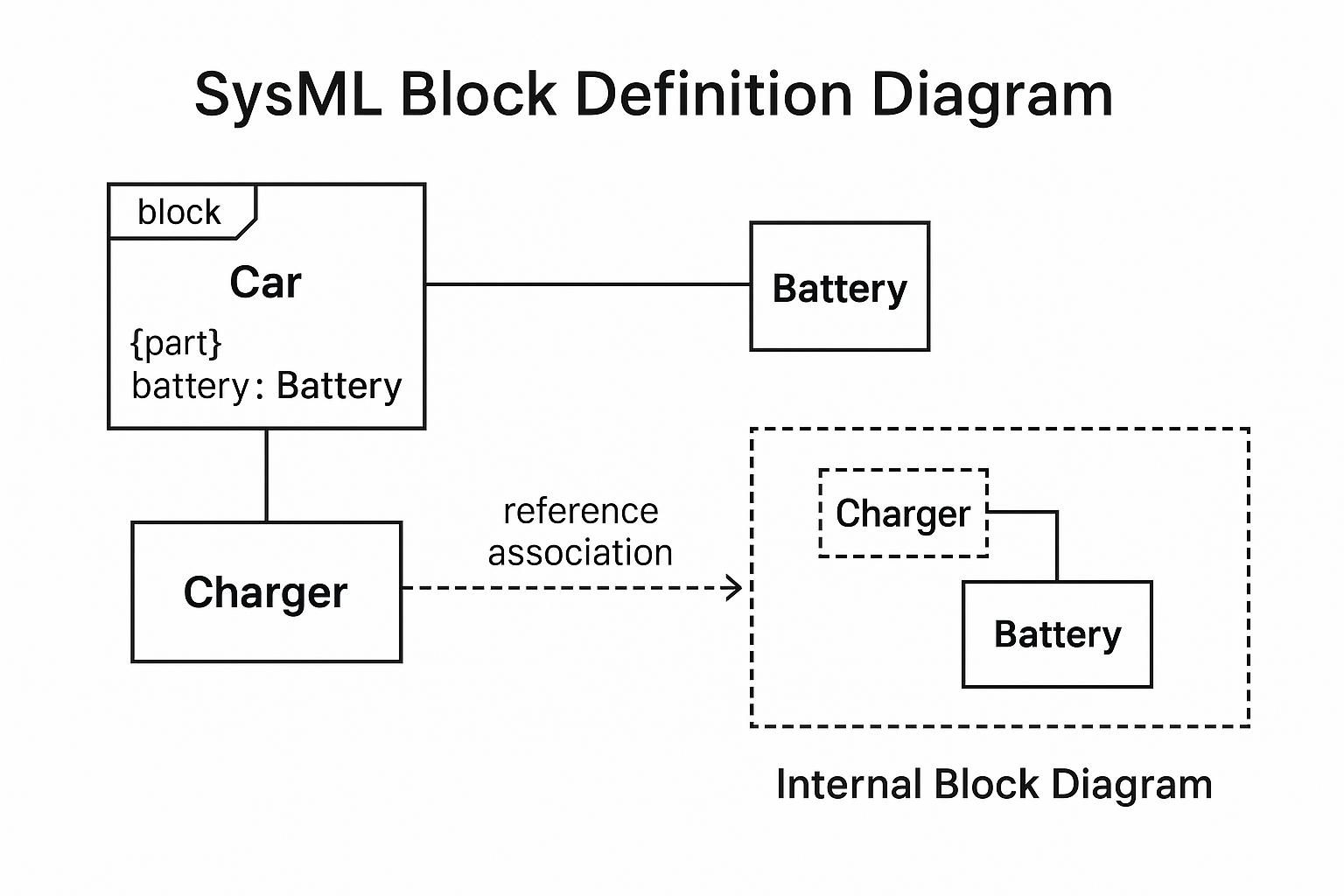
In an Internal Block Diagram (IBD), both Reference and Shared properties are displayed as dotted boxes. This makes them visually indistinguishable within the IBD itself. Therefore, you must always refer back to the Block Definition Diagram (BDD) to understand the precise nature of the association (Shared vs. Reference).
Practical Example: Modeling a Car Charger 🚗⚡
Let's expand on a `Car` model. A `Car` has a `Battery` as a part property. To charge the battery, we need an external `Charger`. The `Charger` is not part of the `Car`, but it needs to interact with the `Battery`.
📝 Modeling the Interaction in an IBD
The real power of reference properties shines in Internal Block Diagrams (IBDs), where we model the actual connections. In an IBD, a reference property is shown as a box with a dotted line, distinguishing it from part properties (solid lines).
- Create the BDD: First, on your Block Definition Diagram (BDD), draw a `Car` block, a `Battery` block, and a `Charger` block. Create a composite association from `Car` to `Battery` (black diamond) and a reference association from `Battery` to `Charger` (plain line, maybe with an arrowhead).
- Create the IBD: Now, create an IBD for the `Car` block. You will see the `Battery` as a solid-lined part property inside the `Car`'s IBD.
- Synchronize Elements: Use your modeling tool's feature (e.g., 'Synchronize Structural Elements' in EA) on the `Battery` block within the IBD. This will pull in its defined relationships.
- Visualize the Reference: The `Charger` will appear as a reference property (a dotted-line box) connected to the `Battery`. This visually shows that the `Car`'s internal battery interacts with an external charger.
- Define Item Flows: You can now model the flow of information or energy. Define an `ItemFlow` for 'Current' from the `Charger` to the `Battery`, and another for 'Battery Status' from the `Battery` to the `Charger`.
Core Concepts Summary 📝
Let's quickly recap the main points to ensure everything is crystal clear.
- No Ownership: The primary characteristic of a reference property is that it signifies a usage or interaction relationship, not ownership. The lifecycle of the referenced element is independent.
- BDD vs. IBD: The BDD defines the type of relationship (Reference, Shared, Composite). The IBD visualizes the instances and their connections, where reference/shared properties appear as dotted boxes.
- Flexibility: This concept allows for modeling complex interactions, especially with external systems or shared resources, providing a more realistic and flexible system architecture.
Reference Property Essentials
Frequently Asked Questions ❓
I hope this post helped you understand the structural elements of SysML like Reference Property and associations. Mastering these concepts is a big step toward creating clear and robust system models. If you have any questions, feel free to ask in the comments! 😊
This article is a re-reation of the core content of the article I wrote last year using AI. If you are interested in the original article, please refer to the HTML below!